실제 작동 보기
anonym.legal이 모든 도구에서 민감한 데이터를 보호하는 방법을 확인하세요.
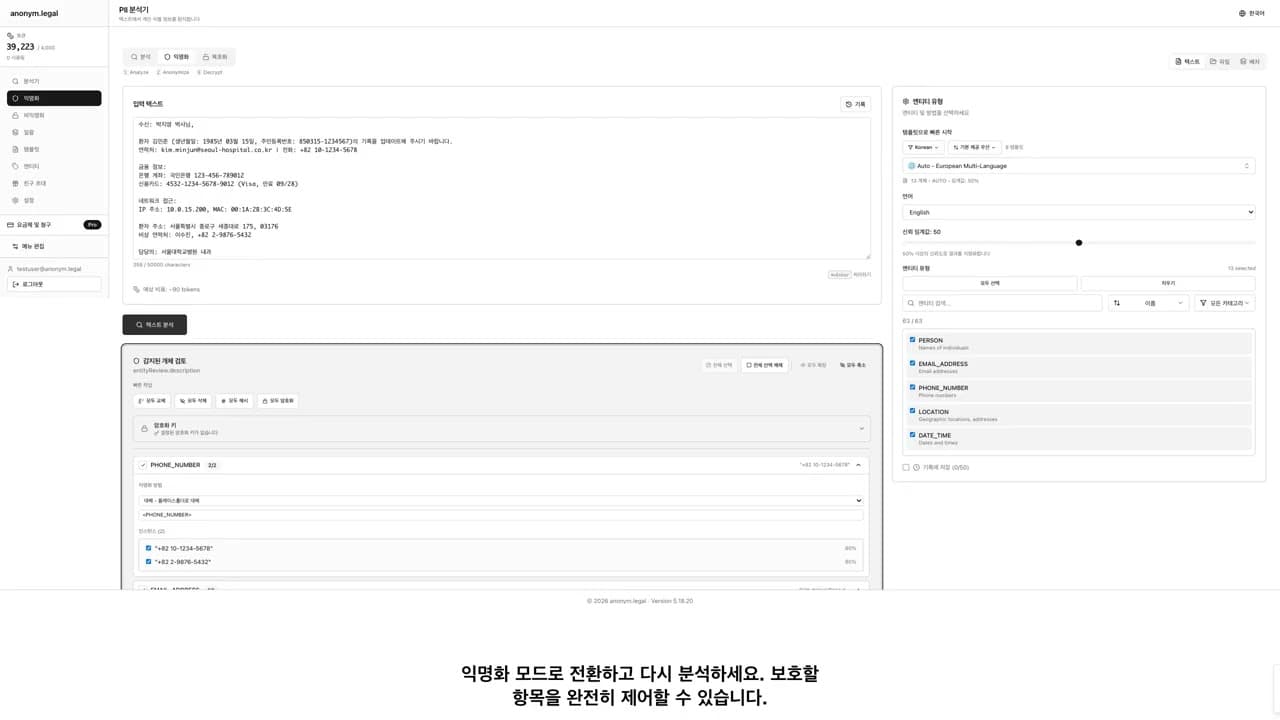
PII 탐지
이름, 이메일, 전화번호, 신용카드, 사회보장번호(SSN), IBAN, IP 주소 등 50개 이상의 엔터티 유형을 여러 카테고리에서 탐지합니다.
- 50개 이상의 엔터티 유형
- 패턴 기반 탐지
- 신뢰도 점수
- 사용자 정의 엔터티 지원
익명화 방법
규정 준수 요구 사항에 맞게 5가지 검증된 익명화 방법 중에서 선택하세요: 대체, 가림 처리, 해시(SHA-256), 암호화(가역적) 또는 부분 마스킹.
- 가짜 데이터로 대체
- 완전히 가림 처리
- SHA-256으로 해시
- 가역적으로 암호화
- 부분적으로 마스킹
다국어 지원
지능형 NLP 처리를 통해 48개 언어를 완벽하게 지원합니다. 아랍어, 히브리어, 페르시아어 및 우르두어에 대한 RTL 지원 포함.
- 48개 언어 지원
- 4개 RTL 언어(아랍어, 히브리어, 페르시아어, 우르두어)
- 언어 자동 감지
- 혼합 언어 문서
- 지연 로딩 NLP 모델
MCP 서버
Cursor 및 VS Code용 HTTP와 함께 제공되는 네이티브 Claude Desktop 통합. 5개의 연산자, 엔터티 그룹, 개인 암호화 키.
- Claude Desktop 및 Cursor와 작동
- 5개의 연산자(암호화, 해시, 마스킹 등)
- 엔터티 그룹 및 템플릿
- 개인 암호화 키
Office 추가 기능
Microsoft Word, Excel 및 PowerPoint에서 직접 문서를 익명화합니다. 273개의 엔터티 유형, 5가지 방법, 미리보기 모드 및 프리셋.
- Word, Excel 및 PowerPoint
- 273개의 엔터티 유형
- 5가지 익명화 방법
- 미리보기 및 프리셋
API 통합
개발자가 PII 탐지 및 익명화를 모든 애플리케이션이나 워크플로우에 통합할 수 있도록 하는 RESTful API입니다. 전체 문서가 제공됩니다.
- RESTful 엔드포인트
- JWT 인증
- 요금 제한
- 포괄적인 문서
일괄 처리
일괄 처리 기능을 사용하여 여러 문서를 한 번에 처리하세요. 기업 플랜은 배치당 최대 100개의 문서를 지원합니다.
- 다중 문서 업로드
- 병렬 처리
- 진행 상황 추적
- 대량 다운로드
데스크톱 앱
클라우드 기반 엔터티 감지를 사용하면서 문서를 장치에 보관하세요. 분석을 위해 추출된 텍스트만 전송됩니다.
- 문서는 장치에 보관됩니다
- 군사 등급의 금고 암호화
- 암호화된 로컬 기록
- Windows, macOS, Linux
크롬 확장 프로그램
ChatGPT, Claude 및 Gemini를 사용할 때 개인 정보를 보호하세요. AI 챗봇에 메시지를 보내기 전에 PII를 자동으로 감지하고 익명화합니다.
- ChatGPT, Claude, Gemini 지원
- 실시간 PII 가로채기
- 응답에서의 비익명화
- 기업 배포 준비 완료
제로 지식 보안
귀하의 비밀번호는 절대 귀하의 기기를 떠나지 않습니다. 우리는 귀하의 비밀번호를 절대 보지 않고도 귀하를 확인하기 위해 암호학적 증명을 사용합니다 - 계정을 보호하는 가장 안전한 방법입니다.
- 비밀번호가 전송되지 않음
- 24단어 복구 문구
- Argon2id + XChaCha20-Poly1305
- 모든 플랫폼에서 작동
스캔 및 사진 속 PII 가리기
PNG 및 JPG 이미지에서 개인정보를 자동으로 감지하고 안전하고 확실하게 가려 드립니다. OCR 기술이 이미지 속 텍스트를 정확하고 꼼꼼하게 읽어내고, 저희 엔진이 개인식별정보(PII)를 빠짐없이 찾아내며, 일치하는 모든 항목은 완전히 불투명한 검은색 상자로 가려집니다.
왜 anonym.legal을 선택해야 하나요?
규정 준수를 위해 신뢰할 수 있는 투명하고 감사 가능한 결과
우리의 접근 방식: 하이브리드 감지
- 구조화된 데이터용 정규식 (이메일, SSN, 신용카드)
- 이름과 조직을 위한 검증된 ML 모델
- 규정 준수를 위해 완전히 감사 가능
- 투명한 패턴 매칭
- 빠르고 일관된 성능
생성 AI 솔루션
- ⚠️실행 간 결과가 다름
- ⚠️블랙 박스 의사 결정
- ⚠️훈련 데이터 필요
- ⚠️시간에 따른 모델 드리프트
- ⚠️더 높은 컴퓨팅 비용
Frequently Asked Questions
How many entity types does anonym.legal detect?
anonym.legal detects 273 entity types including names, addresses, phone numbers, emails, SSNs, credit cards, IBANs, medical record numbers, and many more. All entity types support checksum validation where applicable.
What languages are supported for PII detection?
We support 48 languages including English, German, French, Spanish, Italian, Portuguese, Dutch, Polish, Russian, Chinese, Japanese, Korean, Arabic, Hebrew, and many more. Each language has optimized NER models.
What anonymization methods are available?
Five methods: Replace (with placeholder), Mask (partial hiding), Hash (SHA-256/SHA-512), Encrypt (AES, reversible with your key), and Redact (complete removal). Each entity can use a different method.
Can I use anonym.legal offline?
The Desktop App allows local file handling, but PII detection requires an internet connection to our secure API. For fully air-gapped environments, contact us about on-premise deployment.
Is there an API for developers?
Yes! We offer a REST API and an MCP Server for AI tool integration. The API supports analyze, anonymize, and batch processing endpoints. See our API documentation for details.
Limitations / Important note
Detection is probabilistic, so review high-stakes outputs before relying on them. This page is informational and is not legal advice. Coverage and accuracy vary by language, document type, and jurisdiction.
About this page
We update this page when our platform or the law changes.
Read our founder note for how we work.
Each change shows up in the timestamp at the top.
Related reading
We follow these rules
- GDPR (EU 2016/679).
- ISO/IEC 27001:2022, held by our hosting provider.
- NIS2 (EU 2022/2555).
- HIPAA safe harbor under 45 CFR § 164.514(b)(2).
Our promise
We do not sell your data.
We do not train models on your text.
We store your files in Germany.
You can delete your account at any time.
You own your work.
Where we run
Our company HQ is in Saarbrücken, Germany. Our servers run in Hetzner's Falkenstein datacenter.
Hetzner holds ISO 27001 certification.
All data stays in the EU.
Backups run every day.
Need help?
Email support@anonym.legal.
We reply within one business day.
How we test
Automated checks run on every release.
Each surface gets its own sweep script and report.
Human reviewers spot-check the output each week.
We test detection against sample documents before each release.
A failing unit or integration run stops the release.
What we never do
- We never sell your information to third parties.
- We never train models on what you upload.
- We never keep your work after you delete it.
- We never share keys with any outside firm.
- We never run ads inside the product.
Plans in plain words
We sell credits, not seats.
One credit covers one short job.
Long jobs use a few credits each.
Paid plans can buy top-up credits.
Credits reset at the end of each cycle.
Read the plans page for current rates.
Who built this
A small team of engineers and lawyers built this.
We ship from Europe and work in the open.
Our founder note spells out why we started.
Where to start
- Open the web app and try a sample file.
- Learn how credits get counted.
- See current plans and limits.
- Meet the team behind the product.
How the parts fit
A browser add-on cleans text inside Chrome.
A Word plug-in handles drafts in Office.
A small desktop tool works on whole folders.
An agent protocol link feeds large models safely.
All four share one core engine and one rule set.
Words from our team
We started this work after a lunch about cookies.
One friend kept getting odd ads on her phone.
We asked why a court file leaked through a draft.
We sketched the first build on a napkin that week.
By month three we had a tiny demo for a friend.
She used it on her first case the next day.
Common questions we hear
Can the tool read scanned PDFs? Yes, with OCR.
Does it work on long files? Yes, in small chunks.
Can I roll my own rule set? Yes, save it as a preset.
Does it run offline? The desktop build runs offline.
Do you keep my files? No, the cloud build wipes after each run.
Will it learn from my work? No, we never train on inputs.
A short tour of the workflow
Upload a file or paste a snippet of prose.
Pick the entities you want gone from the draft.
Choose a method: replace, mask, hash, encrypt, or redact.
Press run and watch the side panel show each hit.
Skim the result and tweak any rule that misfired.
Save the cleaned file or send it to a teammate.