工作原理
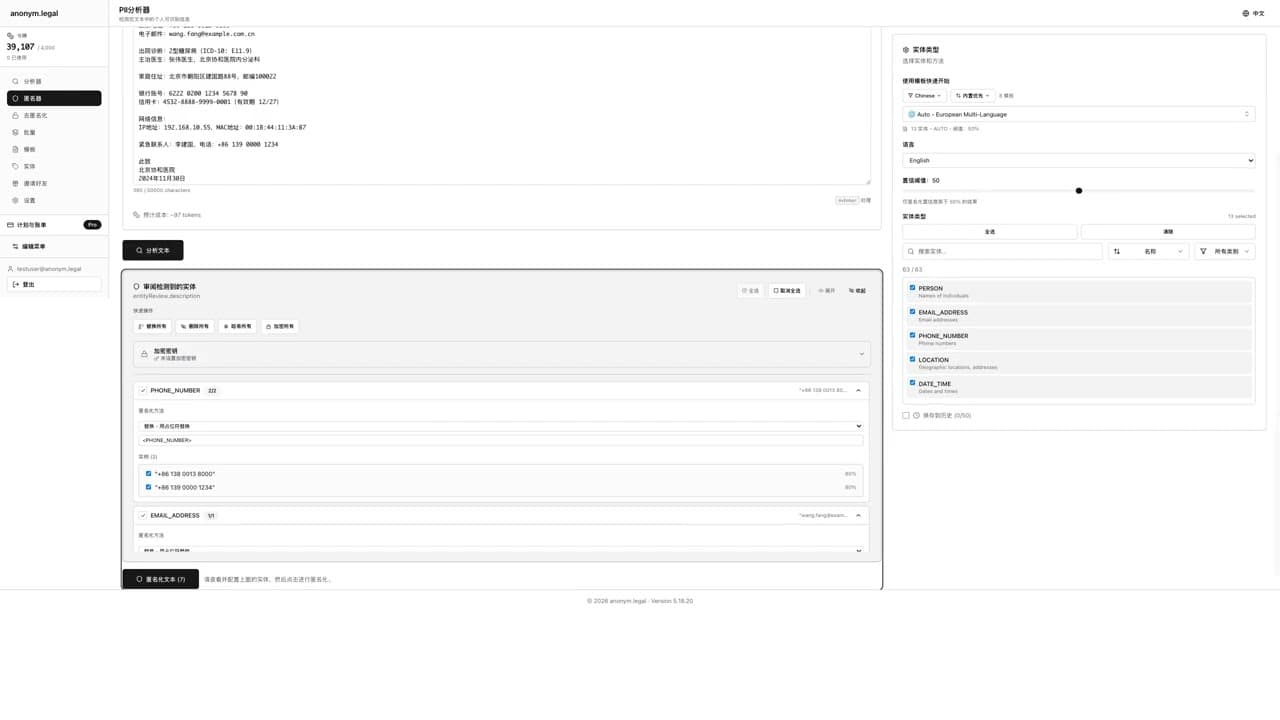
保护文档中敏感数据的四个简单步骤
上传或粘贴
通过我们的网页界面、API 或 Office 插件输入您的文本
分析
我们的正则引擎检测 273 种 PII 实体类型,支持 48 种语言
审核
准确查看检测到的内容及其置信度分数
匿名化
应用您选择的匿名化方法并下载结果
与隐私保护的 AI 集成
连接您的 AI 工具,如 Cursor 和 Claude 桌面,同时通过自动 PII 匿名化保护您的敏感数据。
Your AI Tool
(Cursor, Claude)
MCP Server
(Anonymizes PII)
AI Processes
(Safe data only)
Restore Values
(Optional)
MCP 服务器充当您的 AI 工具与敏感数据之间的隐私屏障。它在发送到 AI 之前自动检测和匿名化 PII,然后在响应中恢复原始值——确保 AI 从未看到您的真实数据。
无缝 AI 工具集成
与 Cursor、Claude 桌面和其他 MCP 兼容工具配合使用
隐私优先架构
AI 仅处理匿名化数据——原始 PII 永远不离开您的控制
可逆匿名化
令牌化允许您在需要时恢复原始值
相同的令牌定价
使用您现有的令牌余额——没有额外费用
支持的 AI 工具:
在专业版和商业版中可用。升级以解锁。
安全处理文档
最大隐私与安全文件处理。文档保留在您的设备上——仅提取的文本用于分析。
Drag & Drop
(Your files)
Local File Reading
(On your device)
Analyze & Anonymize
(Text only, EU-hosted API)
Save Result
(Stay local)
桌面应用程序完全在您的设备上处理文档。文件在本地读取,仅提取的文本发送进行分析,您的文档保持私密。
安全文件处理
文档保留在您的计算机上——仅提取的文本发送到我们的安全 API
加密本地存储
历史记录、预设和加密密钥存储在您的加密本地保险库中
拖放界面
简单、直观的工作流程——拖动文件并立即获取结果
多种格式
PDF、DOCX、TXT 等——处理任何文档类型
可用于:
检测姓名、电子邮件、电话号码、信用卡、社会安全号码、国际银行账号、IP 地址等多个类别。
全面支持 48 种语言,包括英语、德语、西班牙语、法语和其他 43 种语言,支持阿拉伯语、希伯来语、波斯语和乌尔都语的 RTL。由 spaCy、Stanza 和 XLM-RoBERTa NLP 引擎提供支持。
替换、涂黑、哈希(SHA-256)、加密(可逆)或掩码——选择适合您用例的保护方法。
企业级可靠性,具备监控、自动备份和事件响应程序。
实时演示
观看 anonym.legal 如何在您常用的工具中实时保护敏感数据。
Latest Insights
Research, guides, and analysis on data privacy
Real-Time PII Prevention Saves $2.2M
IBM found a $2.2M cost difference between prevention and detection. Here's the math that makes real-time PII interception non-optional for security teams.
GDPR Art. 32: AI Tools PII Monitoring
Enterprise compliance teams need quantitative evidence of AI tool PII controls. Network DLP misses browser AI interactions.
Real-Time PII Prevention for AI Data Leaks
When an employee types a customer name into ChatGPT, the data leaves organizational control in real-time. Post-hoc DLP cannot un-ring this bell.
About this page
We update this page when our platform or the law changes.
Read our founder note for how we work.
Each change shows up in the timestamp at the top.
Related reading
We follow these rules
- GDPR (EU 2016/679).
- ISO/IEC 27001:2022, held by our hosting provider.
- NIS2 (EU 2022/2555).
- HIPAA safe harbor under 45 CFR § 164.514(b)(2).
Our promise
We do not sell your data.
We do not train models on your text.
We store your files in Germany.
You can delete your account at any time.
You own your work.
Where we run
Our company HQ is in Saarbrücken, Germany. Our servers run in Hetzner's Falkenstein datacenter.
Hetzner holds ISO 27001 certification.
All data stays in the EU.
Backups run every day.
Need help?
Email support@anonym.legal.
We reply within one business day.
How we test
Automated checks run on every release.
Each surface gets its own sweep script and report.
Human reviewers spot-check the output each week.
We test detection against sample documents before each release.
A failing unit or integration run stops the release.
What we never do
- We never sell your information to third parties.
- We never train models on what you upload.
- We never keep your work after you delete it.
- We never share keys with any outside firm.
- We never run ads inside the product.
Plans in plain words
We sell credits, not seats.
One credit covers one short job.
Long jobs use a few credits each.
Paid plans can buy top-up credits.
Credits reset at the end of each cycle.
Read the plans page for current rates.
Who built this
A small team of engineers and lawyers built this.
We ship from Europe and work in the open.
Our founder note spells out why we started.
Where to start
- Open the web app and try a sample file.
- Learn how credits get counted.
- See current plans and limits.
- Meet the team behind the product.
How the parts fit
A browser add-on cleans text inside Chrome.
A Word plug-in handles drafts in Office.
A small desktop tool works on whole folders.
An agent protocol link feeds large models safely.
All four share one core engine and one rule set.
Words from our team
We started this work after a lunch about cookies.
One friend kept getting odd ads on her phone.
We asked why a court file leaked through a draft.
We sketched the first build on a napkin that week.
By month three we had a tiny demo for a friend.
She used it on her first case the next day.
Common questions we hear
Can the tool read scanned PDFs? Yes, with OCR.
Does it work on long files? Yes, in small chunks.
Can I roll my own rule set? Yes, save it as a preset.
Does it run offline? The desktop build runs offline.
Do you keep my files? No, the cloud build wipes after each run.
Will it learn from my work? No, we never train on inputs.
A short tour of the workflow
Upload a file or paste a snippet of prose.
Pick the entities you want gone from the draft.
Choose a method: replace, mask, hash, encrypt, or redact.
Press run and watch the side panel show each hit.
Skim the result and tweak any rule that misfired.
Save the cleaned file or send it to a teammate.